Keep the whole story.
Logins, secure notes, tags, custom fields, security questions, and password history belong together.
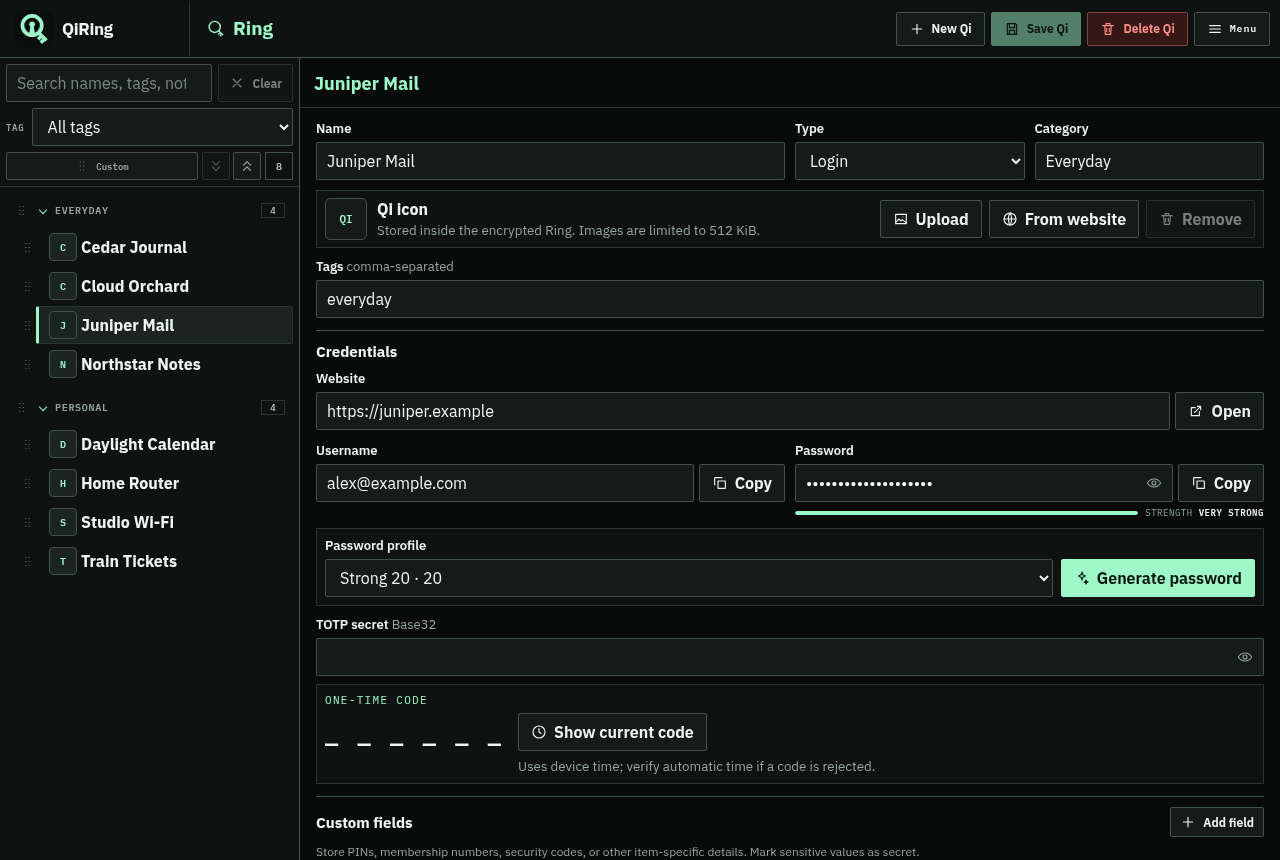
Explore the Qi editor ↗A quieter way to keep your digital life together. Passwords, two-factor codes, and private notes, in one encrypted home on your computer.
Linux · Windows · macOS / Free & open source
Start with a master password. Your encrypted Ring stays on your computer.
Open your Ring, generate passwords, and check their health offline.
Read the source, follow development, and understand how your data is handled.
A little less scattered
A saved entry is a Qi. Your encrypted collection is a Ring. A few simple ideas to bring the important things together.
Logins, secure notes, tags, custom fields, security questions, and password history belong together.
Explore the Qi editor ↗Save password profiles with your own length and character rules. Generate a fresh password when you need one.
Meet password profiles ↗Save your recovery key, make encrypted backups, and use local snapshots to protect against mistakes.
Plan your backups ↗Local by design
QiRing has no cloud-sync backend, online account, or app telemetry. Encryption and password-health checks happen on your device.
Understand the security model
You choose your backup destination.
A considered first step
Getting started takes a few deliberate steps. The guide walks you through each one.
Open the user guide ↗Choose an installer or a portable archive for your computer.
Set a master password and record your recovery key somewhere safe and separate.
Add your first Qi, or preview and map a CSV import from another tool.
Small app. Important things.
QiRing is in early development. Start with test data and keep independent backups.